Bambook 一款開源的Flutter垂直排版套件。
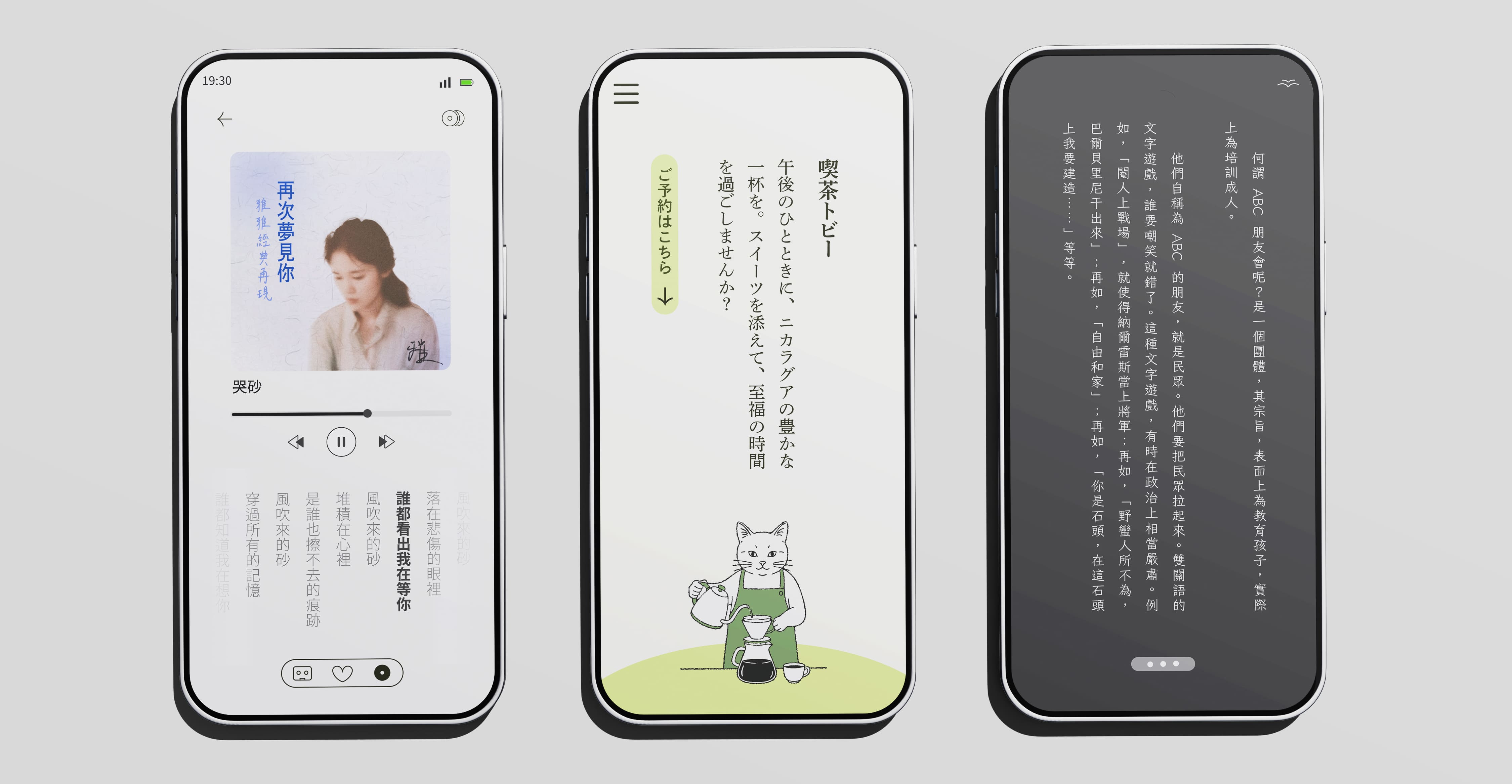
垂直文本對於中、日、韓、越以及蒙古文…等,十分常見,然Flutter中卻未提供垂直文本框。Bambook套件提供的相關方法,能夠使開發者快速配置垂直文本。
pub.dev連結:https://pub.dev/packages/bambook/
開始使用
首先,請在您的 pubspec.yaml 檔案中加入 bambook 的依賴:
dependencies:
  bambook: ^0.0.4 # 或更新
接著,在您的 Dart 程式碼中匯入套件:
import 'package:bambook/bambook.dart';
BambookText 語法示意
BambookText 是本套件的核心 Widget,用法與 Flutter 原生的 Text Widget 非常相似。
const BambookText(
  "四季遞嬗,日月更迭,唯有筆墨如石堅。--TwinType",
  style: TextStyle(
    fontSize: 22,
    color: Color.fromARGB(255, 8, 19, 76),
    fontFamily: 'LINESeed-TW_Rg',
  ),
  textAlign: BambookTextAlign.justify,
  language: BambookLanguage.tc,
  direction: BambookTextDirection.rtl,
  orientation: BambookTextOrientation.mixed,
  applyKinsoku: true,
  tateChuYoko: (false, 0),
  punctuationFixMode: PunctuationFixMode.auto,
  lineSpacing: 24.0,
  letterSpacing: -10,
);
參數詳解
以下是 BambookText 各個參數的詳細說明:
| 參數名 (Parameter) | 中文名稱 | 型別 (Type) | 預設值 (Default) | 說明 (Description) |
|---|---|---|---|---|
data |
文本值 | String |
必填 | 您想要顯示的文字內容。 |
style |
樣式 | TextStyle? |
null |
文字樣式,支援 fontSize 等屬性。 |
textAlign |
文本對齊方法 | BambookTextAlign |
BambookTextAlign.top |
設定單一行的垂直對齊方式。可選值有:top (頂端對齊)、center (置中對齊)、bottom (底端對齊)、justify (頂底齊行)。 |
direction |
換行方向 | BambookTextDirection |
BambookTextDirection.rtl |
設定換行方向。可選值有:rtl (由右至左換行,適用於傳統 CJK 書寫) 或 ltr (由左至右換行)。 |
orientation |
拉丁與數字行中處理方法 | BambookTextOrientation |
BambookTextOrientation.mixed |
此子Latin與數字的字符方向一共分為三種設定。第一:mixed將使其以組為單位順時針旋轉90度,第二:upright 則會讓其保持直立;第三:tateChuYoko此設定會使所有拉丁與數字變為橫排 |
language |
語系 | BambookLanguage |
BambookLanguage.tc |
文種設定,這會影響標點符號的預設位置。tc (繁體中文) 會讓標點符號置中;而 sc (簡體中文)、jp (日文)、kr (韓文) 則會讓標點符號靠上對齊。這個設定是為了符合不同地區的排版習慣。 |
applyKinsoku |
避頭尾 | bool |
true |
是否啟用避頭尾規則 (Kinsoku)。開啟後,可以防止逗號、句號等標點符號出現在一行的開頭。 |
lineSpacing |
行距 | double |
10.0 |
額外欄間距。設定欄與欄之間額外增加的空白距離 (邏輯像素 px)。 警告: 建議您不要使用 text.style中的height,或將其設為1因其為Flutter預設文本的參數,套用到Bambook後會導致錯誤。
|
letterSpacing |
字元間距 | double |
0.0 |
垂直字元間距。設定同一行中每個字元之間的額外垂直距離。 警告:請勿使用 style.letterSpacing,因為它會導致字元水平變寬 (行寬變大),而非增加垂直間距。若要調整直排字距,請務必使用此參數。 |
punctuationFixMode |
標點位置修正 | PunctuationFixMode |
PunctuationFixMode.auto |
標點符號修正模式。由於不同作業系統(特別是 Android)對 CJK 字體的支援度不一,部分字體的標點符號(如逗號、句號)在垂直排版時可能會偏離中心線。此參數用於修正此問題: - auto:會根據您是否配置字體為依據- force:強制啟用修正。- disable:停用修正。若您已使用自訂字體(如 Noto Sans TC)或在 iOS/macOS 開發,建議設為 disable 以獲得最佳效能與效果。 |
tateChuYoko |
縱中橫例外處理 | (bool, int)? |
null |
縱中橫 (Tate-chu-yoko) 功能。當設定為 (bool, N) 時,長度小於或等於 N 的連續西文或數字會自動轉為橫向排列,嵌入在垂直文字流中。例如,tateChuYoko: (true, 2) 會讓 “A1”、”25” 等字串橫排顯示。若為 null 則停用此功能。如果設為(false, 2)仍為關閉。 |
BambookLanguage 的重要性
BambookLanguage 參數不僅僅是一個提示,它會直接影響標點符號的渲染方式,以符合不同語區的標準排版規範。此外,它還會自動為底層的 TextStyle 設定對應的 Locale,這有助於 Flutter 選擇更適合該語言的字體,進而影響字符的實際顯示效果。
-
BambookLanguage.tc(繁體中文):- 標點符號(如
,、。)會被放置在字元的正中央。 - 自動設定
Locale('zh', 'Hant')。
- 標點符號(如
-
BambookLanguage.sc(簡體中文):- 標點符號會被放置在字元框的右上角。
- 自動設定
Locale('zh', 'CN')。
-
BambookLanguage.jp(日文):- 標點符號會被放置在字元框的右上角。
- 自動設定
Locale('ja', 'JP')。
-
BambookLanguage.kr(韓文):- 標點符號會被放置在字元框的右上角。
- 自動設定
Locale('ko', 'KR')。
正確設定此參數,能確保您的排版結果在視覺上更貼近目標讀者的閱讀習慣,並獲得更精準的字體渲染。唯該設定在部分 Android 系統上出現字體調用正確,但標點錯誤之情況,因此如果您使用 Android 平台且未自定義字體,強力建議您將 punctuationFixMode 設為 force 以確保顯示正確。
語法範例
請參閱專案中example資料夾下範例
import 'package:flutter/material.dart';
import 'package:bambook/bambook.dart';
import 'package:flutter_localizations/flutter_localizations.dart';
void main() {
  runApp(const BambookDemo());
}

class BambookDemo extends StatefulWidget {
  const BambookDemo({super.key});

  @override
  State<BambookDemo> createState() => _BambookDemoState();
}

class _BambookDemoState extends State<BambookDemo> {
  double _textHeight = 400;
  final double _minHeight = 200.0;

  @override
  Widget build(BuildContext context) {
    return MaterialApp(
      home: Scaffold(
        appBar: AppBar(title: const Text('Bambook 垂直排版測試')),
        body: LayoutBuilder(
          builder: (context, constraints) {
            final double availableHeight = constraints.maxHeight - 220;
            return Container(
              width: double.infinity,
              height: double.infinity,
              padding: const EdgeInsets.all(20),
              color: Colors.white,
              child: Column(
                crossAxisAlignment: CrossAxisAlignment.center,
                children: [
                  const SizedBox(height: 20),
                  Align(
                    alignment: Alignment.center,
                    child: Container(
                      height: _textHeight > availableHeight
                          ? availableHeight
                          : _textHeight,
                      constraints: const BoxConstraints(maxWidth: 360),
                      decoration: const BoxDecoration(border: null),
                      alignment: Alignment.center,
                      child: const BambookText(
                        "四季遞嬗,日月更迭,唯有筆墨如石堅。--TwinType",
                        style: TextStyle(
                          fontSize: 22,
                          color: Color.fromARGB(255, 8, 19, 76),
                          fontFamily: 'LINESeed-TW_Rg',
                        ),

                        textAlign: BambookTextAlign.justify, /// 文本對齊
                        language: BambookLanguage.tc, /// 文種模式,目前涉及標點樣式
                        direction:BambookTextDirection.rtl,
                        orientation: BambookTextOrientation.mixed, /// latin處理模式
                        applyKinsoku: true, /// 避頭尾
                        tateChuYoko: (false, 0), /// 縱中橫
                        punctuationFixMode:PunctuationFixMode.auto, /// CJK預設字體修正,如果您未安裝對應語言字型,建議開啟
                        lineSpacing: 24.0, /// 垂直行距
                        letterSpacing: -10, /// 垂直字元間距
                      ),
                    ),
                  ),
                  GestureDetector(
                    behavior: HitTestBehavior.translucent,
                    onVerticalDragUpdate: (details) {
                      setState(() {
                        _textHeight += details.delta.dy;
                        if (_textHeight < _minHeight) _textHeight = _minHeight;
                        if (_textHeight > availableHeight) {
                          _textHeight = availableHeight;
                        }
                      });
                    },
                    child: Container(
                      width: double.infinity,
                      height: 48,
                      alignment: Alignment.center,
                      child: const Icon(Icons.drag_handle, color: Colors.grey),
                    ),
                  ),
                  const Spacer(),
                  const Text(
                    "Powered By TwinType",
                    style: TextStyle(
                      color: Colors.grey,
                      fontSize: 12,
                      letterSpacing: 1.2,
                    ),
                  ),
                ],
              ),
            );
          },
        ),
      ),
    );
  }
}
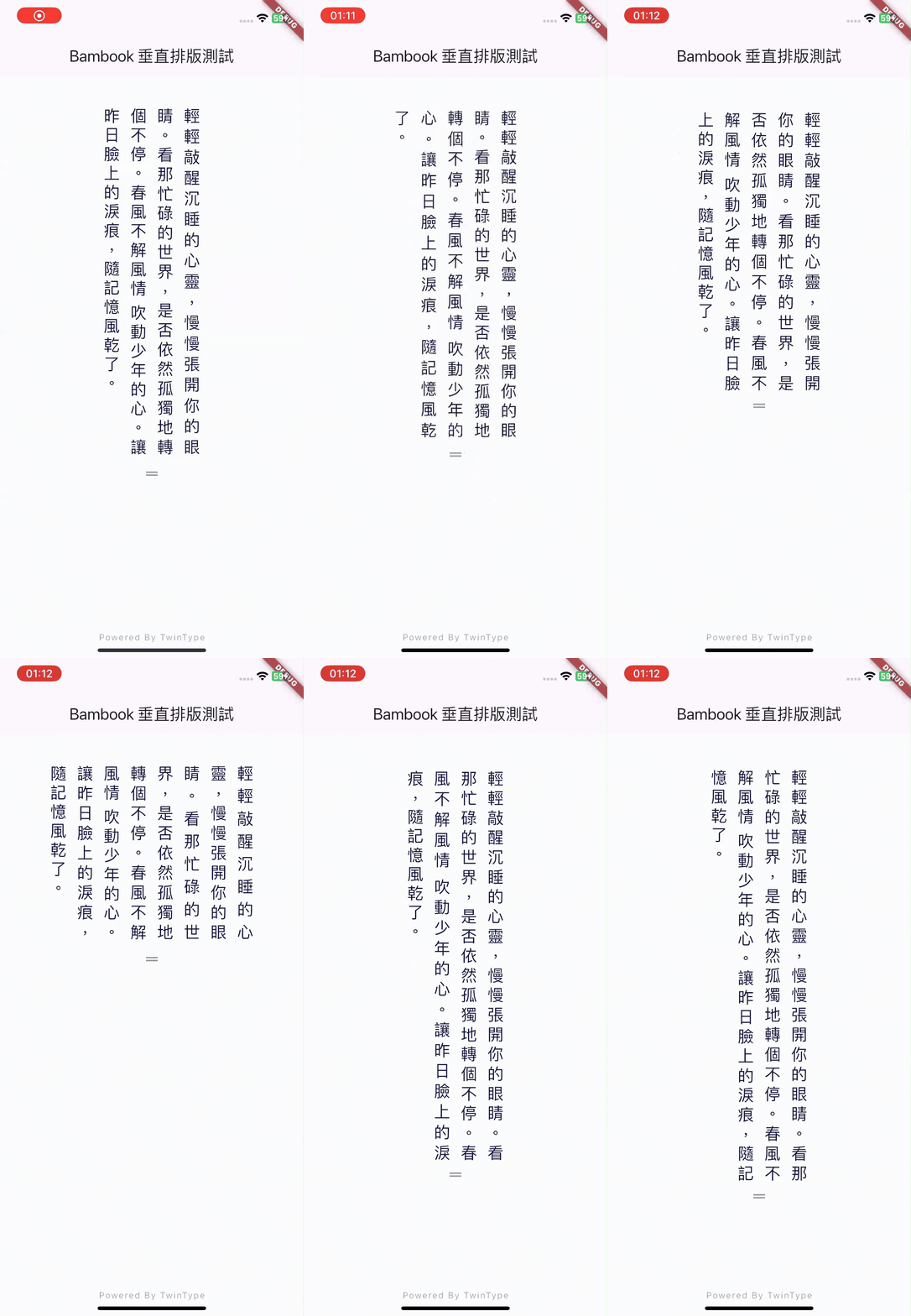
警語
本套件仍處於前期開發階段,且東亞語系十分複雜,我們致力於盡量貼近多數使用情境,目前仍在持續改進中,無法保證在所有情況下皆正確,例如:日文與冰島語混排。請您務必自行核對排版結果是否正確,特別是在涉及孩童教育等重要用途時。
如您是語言或字體排印相關領域的專家,歡迎與我們聯繫提供建議與指正。
本項目為 Typexedra 計畫之一,由 TwinType 支持與維護。錯誤或功能請求請提交 issue。希望這份文件能幫助您更順利地使用 Bambook!如有任何問題,歡迎隨時提出。
授權
本套件採用MIT授權條款開源,請確保閱讀完整授權資訊,並遵守其規範。
Copyright (C)
Permission is hereby granted, free of charge, to any person obtaining a copy of this software and associated documentation files (the “Software”), to deal in the Software without restriction, including without limitation the rights to use, copy, modify, merge, publish, distribute, sublicense, and/or sell copies of the Software, and to permit persons to whom the Software is furnished to do so, subject to the following conditions:
The above copyright notice and this permission notice shall be included in all copies or substantial portions of the Software.
THE SOFTWARE IS PROVIDED “AS IS”, WITHOUT WARRANTY OF ANY KIND, EXPRESS OR IMPLIED, INCLUDING BUT NOT LIMITED TO THE WARRANTIES OF MERCHANTABILITY, FITNESS FOR A PARTICULAR PURPOSE AND NONINFRINGEMENT. IN NO EVENT SHALL THE AUTHORS OR COPYRIGHT HOLDERS BE LIABLE FOR ANY CLAIM, DAMAGES OR OTHER LIABILITY, WHETHER IN AN ACTION OF CONTRACT, TORT OR OTHERWISE, ARISING FROM, OUT OF OR IN CONNECTION WITH THE SOFTWARE OR THE USE OR OTHER DEALINGS IN THE SOFTWARE.
備註
-
V0.0.4為首個正是面向公眾之版本,0.0.1~0.0.3為內部測試版本。此文件對應Bamnook v0.0.4。 -
本項目為Typexedra之子計畫之一,由TwinType支持與維護。錯誤或功能請求請提交 issue。如果您是技術或語言專案,歡迎您加入討論與分享,您可以透過Github或連繫:[email protected]。十分感恩!
-
您可參閱下章節:名詞解釋與排應說明了解更多排印與Bambook使用技巧。