Bambook: An open-source vertical typesetting package for Flutter.
Vertical text is common across many East Asian weiting system(e.g.CJKV). But ironically, Flutter does not provide a native vertical text box. Bambook is here to save the day, allowing developers to quickly create vertical text layouts.
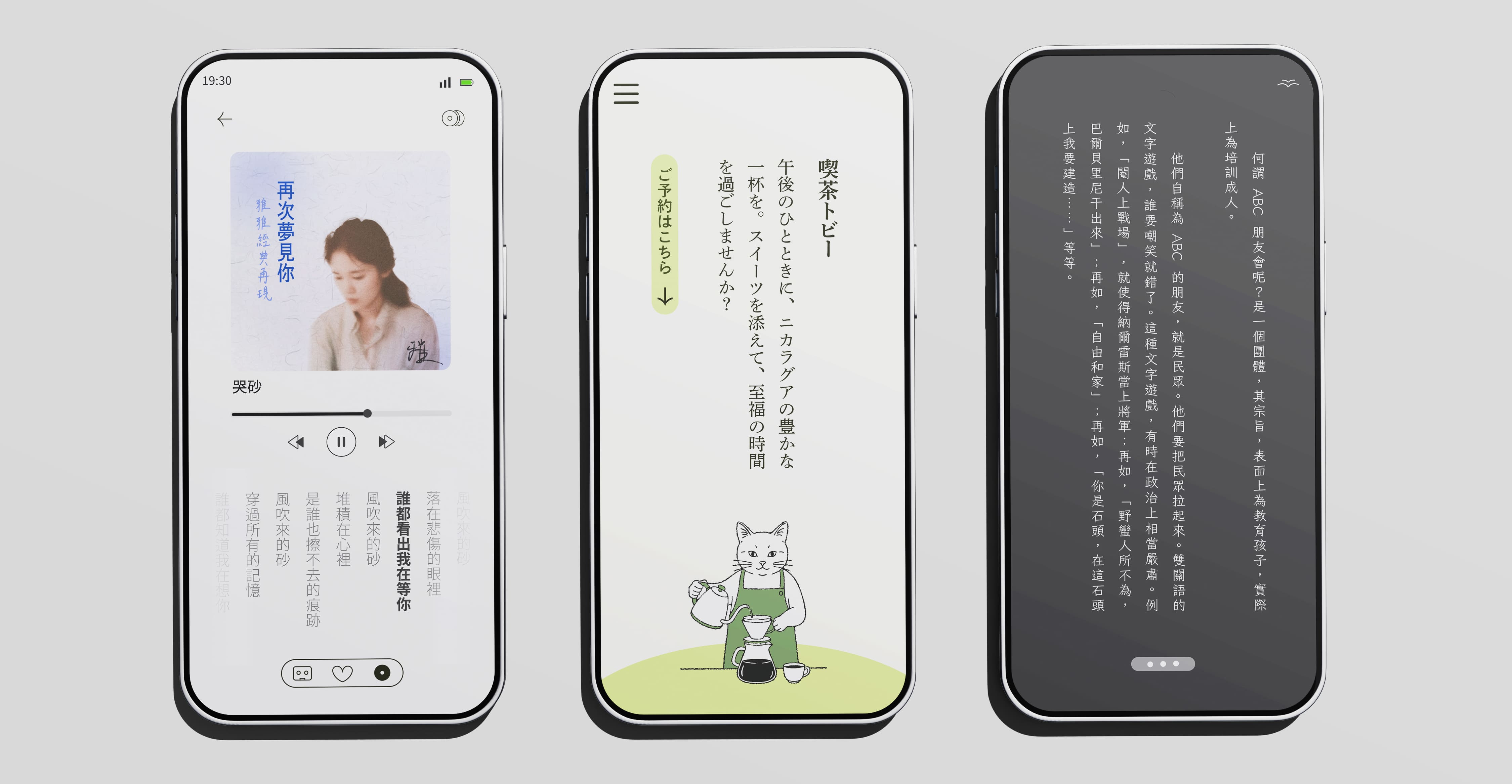
pub.dev link: https://pub.dev/packages/bambook/
Getting Started
First, add bambook to your dependencies in pubspec.yaml:
dependencies:
  bambook: ^0.0.4 # or newer
Next, import the package in your Dart code:
import 'package:bambook/bambook.dart';
BambookText Syntax Overview
BambookText is the core Widget of this package. Its usage is very similar to Flutter’s
native Text Widget.
const BambookText(
  "四季遞嬗,日月更迭,唯有筆墨如石堅。--TwinType",
  style: TextStyle(
    fontSize: 22,
    color: Color.fromARGB(255, 8, 19, 76),
    fontFamily: 'LINESeed-TW_Rg',
  ),
  textAlign: BambookTextAlign.justify,
  language: BambookLanguage.tc,
  direction: BambookTextDirection.rtl,
  orientation: BambookTextOrientation.mixed,
  applyKinsoku: true,
  tateChuYoko: (false, 0),
  punctuationFixMode: PunctuationFixMode.auto,
  lineSpacing: 24.0,
  letterSpacing: -10,
);
Parameters Deep Dive
Here’s the lowdown on every parameter in BambookText:
| Parameter | Type | Default | Description |
|---|---|---|---|
data |
String |
Required | The text content you want to display. |
style |
TextStyle? |
null |
Text style. Supports properties like fontSize,
color, etc. |
textAlign |
BambookTextAlign |
BambookTextAlign.top |
Sets the vertical alignment for a single line.
Options: top, center, bottom, and
justify (distributes text evenly). |
direction |
BambookTextDirection |
BambookTextDirection.rtl |
Sets the line wrapping direction. Options:
rtl (Right-to-Left, for traditional CJK), or ltr
(Left-to-Right). |
orientation |
BambookTextOrientation |
BambookTextOrientation.mixed |
Controls the orientation of Latin characters and
digits. Three modes: 1. mixed: Rotates them 90° clockwise
(sideways). 2. upright: Keeps them upright. 3. tateChuYoko: Forces them into horizontal orientation. |
language |
BambookLanguage |
BambookLanguage.tc |
Language Setting. This affects the default position of
punctuation. tc (Trad. Chinese) centers punctuation.
sc (Simp. Chinese), jp (Japanese), kr
(Korean) align punctuation to the top-right (or corner). This aligns with regional
typesetting standards. |
applyKinsoku |
bool |
true |
Enables Kinsoku (Line breaking rules). Prevents punctuation marks (like commas and periods) from appearing at the start of a line. |
lineSpacing |
double |
10.0 |
Extra Line Spacing. Adds extra space (logic pixels) between
columns/lines. WARNING: Do not use text.style.height or set it to 1, as it's a default Flutter
text parameter that can cause issues in Bambook.
|
letterSpacing |
double |
0.0 |
Vertical Character Spacing. Sets extra vertical space between
characters within the same line. WARNING: Do not use style.letterSpacing from `TextStyle`, as it increases
horizontal width instead of vertical spacing. Use this parameter for
vertical gap. |
punctuationFixMode |
PunctuationFixMode |
PunctuationFixMode.auto |
Punctuation Position Fix. Since OS fonts (especially on Android) vary
in CJK support, punctuation might be off-center in vertical mode. - auto: Based on font configuration.- force: Force fix.- disable: Disable fix. Recommended if using custom fonts (like Noto
Sans TC) or on iOS/macOS for best performance. |
tateChuYoko |
(bool, int)? |
null |
Tate-chu-yoko (Horizontal-in-Vertical). When set to (bool,
N), consecutive Latin/digits with length <= N will be
rotated to horizontal. E.g., tateChuYoko: (true, 2) makes "A1" or "25"
horizontal. null disables it. (false, 2) is also disabled.
|
The Importance of BambookLanguage
BambookLanguage isn’t just a hint—it directly dictates how punctuation is rendered to meet
standard typesetting rules for different regions. Plus, it automatically sets the
Locale for the underlying TextStyle, helping Flutter pick the
right font and ensuring your characters look crisp.
-
BambookLanguage.tc(Traditional Chinese):- Punctuation (like
,,。) is placed in the center of the character box. - Automatically sets
Locale('zh', 'Hant').
- Punctuation (like
-
BambookLanguage.sc(Simplified Chinese):- Punctuation is placed in the top-right corner of the character box.
- Automatically sets
Locale('zh', 'CN').
-
BambookLanguage.jp(Japanese):- Punctuation is placed in the top-right corner of the character box.
- Automatically sets
Locale('ja', 'JP').
-
BambookLanguage.kr(Korean):- Punctuation is placed in the top-right corner of the character box.
- Automatically sets
Locale('ko', 'KR').
Setting this correctly ensures your layout visually matches the reading habits of your target audience
and gets the most accurate font rendering. However, on some Android
systems, you might see correct font loading but incorrect punctuation
positioning. So, if you’re on Android and not using a custom font, we highly recommend
setting punctuationFixMode to force to keep things looking sharp.
Code Example
Check out the example folder in the project for more.
import 'package:flutter/material.dart';
import 'package:bambook/bambook.dart';
import 'package:flutter_localizations/flutter_localizations.dart';
void main() {
  runApp(const BambookDemo());
}

class BambookDemo extends StatefulWidget {
  const BambookDemo({super.key});

  @override
  State<BambookDemo> createState() => _BambookDemoState();
}

class _BambookDemoState extends State<BambookDemo> {
  double _textHeight = 400;
  final double _minHeight = 200.0;

  @override
  Widget build(BuildContext context) {
    return MaterialApp(
      home: Scaffold(
        appBar: AppBar(title: const Text('Bambook Vertical Typesetting Test')),
        body: LayoutBuilder(
          builder: (context, constraints) {
            final double availableHeight = constraints.maxHeight - 220;
            return Container(
              width: double.infinity,
              height: double.infinity,
              padding: const EdgeInsets.all(20),
              color: Colors.white,
              child: Column(
                crossAxisAlignment: CrossAxisAlignment.center,
                children: [
                  const SizedBox(height: 20),
                  Align(
                    alignment: Alignment.center,
                    child: Container(
                      height: _textHeight > availableHeight
                          ? availableHeight
                          : _textHeight,
                      constraints: const BoxConstraints(maxWidth: 360),
                      decoration: const BoxDecoration(border: null),
                      alignment: Alignment.center,
                      child: const BambookText(
                        "四季遞嬗,日月更迭,唯有筆墨如石堅。--TwinType",
                        style: TextStyle(
                          fontSize: 22,
                          color: Color.fromARGB(255, 8, 19, 76),
                          fontFamily: 'LINESeed-TW_Rg',
                        ),

                        textAlign: BambookTextAlign.justify, /// Text alignment
                        language: BambookLanguage.tc, /// Language mode, affects punctuation style
                        direction:BambookTextDirection.rtl,
                        orientation: BambookTextOrientation.mixed, /// Latin handling mode
                        applyKinsoku: true, /// Line breaking rules (Kinsoku)
                        tateChuYoko: (false, 0), /// Tate-chu-yoko
                        punctuationFixMode:PunctuationFixMode.auto, /// CJK font fix, enable if system font doesn't support CJK vertical punctuation
                        lineSpacing: 24.0, /// Vertical line spacing
                        letterSpacing: -10, /// Vertical character spacing
                      ),
                    ),
                  ),
                  GestureDetector(
                    behavior: HitTestBehavior.translucent,
                    onVerticalDragUpdate: (details) {
                      setState(() {
                        _textHeight += details.delta.dy;
                        if (_textHeight < _minHeight) _textHeight = _minHeight;
                        if (_textHeight > availableHeight) {
                          _textHeight = availableHeight;
                        }
                      });
                    },
                    child: Container(
                      width: double.infinity,
                      height: 48,
                      alignment: Alignment.center,
                      child: const Icon(Icons.drag_handle, color: Colors.grey),
                    ),
                  ),
                  const Spacer(),
                  const Text(
                    "Powered By TwinType",
                    style: TextStyle(
                      color: Colors.grey,
                      fontSize: 12,
                      letterSpacing: 1.2,
                    ),
                  ),
                ],
              ),
            );
          },
        ),
      ),
    );
  }
}
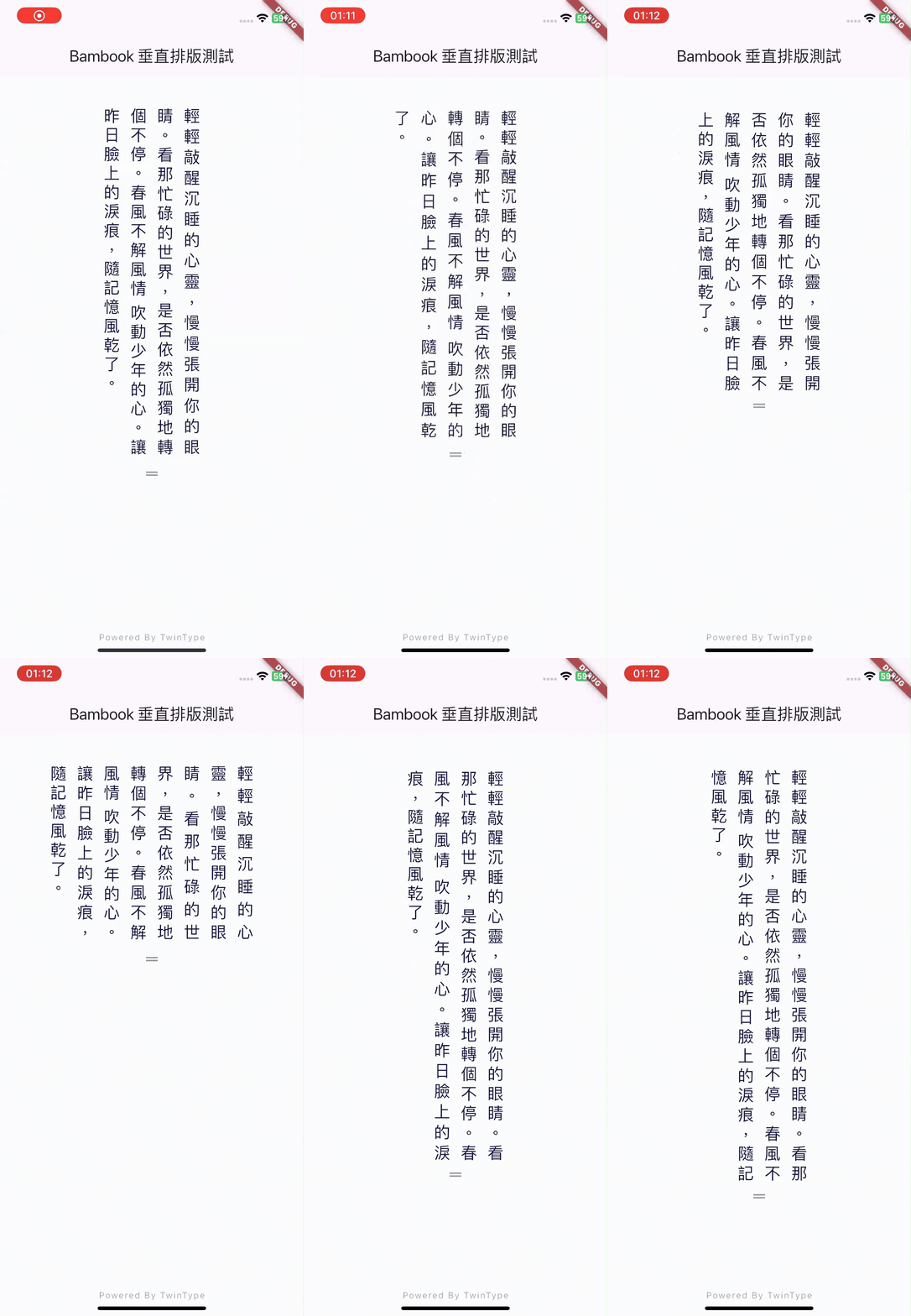
Disclaimer
This package is still in an early stage of development. East Asian typography is complex, and while we aim to cover most common use cases, we’re still improving things. We can’t guarantee correctness in every weird scenario (like mixing Japanese with Icelandic… wild!). Please manually verify your layout results, especially for critical uses like children’s education.
If you’re a linguistics or typography expert, we’d love your feedback!
This project is part of the Typexedra initiative, supported and maintained by TwinType. Submit issues for bugs or feature requests. Hope Bambook helps you build cool stuff! Any questions? Just ask.
License
This package is open source under the MIT License. Please read the full license text and abide by it.
Copyright (C)
Permission is hereby granted, free of charge, to any person obtaining a copy of this software and associated documentation files (the “Software”), to deal in the Software without restriction, including without limitation the rights to use, copy, modify, merge, publish, distribute, sublicense, and/or sell copies of the Software, and to permit persons to whom the Software is furnished to do so, subject to the following conditions:
The above copyright notice and this permission notice shall be included in all copies or substantial portions of the Software.
THE SOFTWARE IS PROVIDED “AS IS”, WITHOUT WARRANTY OF ANY KIND, EXPRESS OR IMPLIED, INCLUDING BUT NOT LIMITED TO THE WARRANTIES OF MERCHANTABILITY, FITNESS FOR A PARTICULAR PURPOSE AND NONINFRINGEMENT. IN NO EVENT SHALL THE AUTHORS OR COPYRIGHT HOLDERS BE LIABLE FOR ANY CLAIM, DAMAGES OR OTHER LIABILITY, WHETHER IN AN ACTION OF CONTRACT, TORT OR OTHERWISE, ARISING FROM, OUT OF OR IN CONNECTION WITH THE SOFTWARE OR THE USE OR OTHER DEALINGS IN THE SOFTWARE.
Notes
-
V0.0.4is our first public release. 0.0.1~0.0.3 were internal alpha builds. This doc is forBambook v0.0.4. -
This project is a sub-project of Typexedra, maintained by TwinType. For bugs or features, submit an issue. If you’re a tech or language expert, join our discussion! Share via GitHub or email: [email protected]. Much appreciated!
-
Check out the next chapter: Glossary and Typography Guide to learn more about vertical text and Bambook tricks.